For universities, schools and training centres in Algeria
Take attendance by QR code, at every session.
Hadhir records attendance in class, counts absences and keeps the proof, as ministerial order 1165 requires.
Are you a student? Download the app
Tutorial · Calculus 2
Group 3
New QR code every 3 s
Present
21 / 32
- Yacine M.08:30
- Lina K.08:30
- Amine B.08:30
08:30
Hadhir
Point at the QR code shown in class
The limits of the paper sign-in sheet
Since order 1165, attendance must be taken at every tutorial and lab session, and absences lead to exclusion. On paper, three things go wrong.
People sign for absent students
A sheet passed around the room does not tell you who was really there.
Counting is done by hand
Copying sheets, counting absences per subject, preparing the exclusion list: long work, repeated every semester.
Nothing can be proven
When a student contests an exclusion, a lost or badly copied sheet does not hold up.
How it works
Four steps, from the classroom to the head of department's office.
Open the session
The teacher opens the session. A QR code appears and changes every 3 seconds.
Scan
Students scan with their phone, linked to their account. One scan per student. Without a phone, the teacher marks them present by hand.
Count
Absences count themselves. Absence notes arrive online and the administration approves them.
Prove
At-risk students show up before exclusion. The log keeps who changed what, and when.
What Hadhir does for order 1165 and other regulations
Each line cites the article. We only list what Hadhir already does.
| Text | What it requires | What Hadhir does |
|---|---|---|
| Order 1165 · art. 34 | What it requiresAttendance at every tutorial, lab, workshop and internship session. | What Hadhir doesAnti-fraud QR code that changes every 3 s. Manual marking for a student without a phone. |
| Order 1165 · art. 36 | What it requiresCounting absences and exclusion from the subject. | What Hadhir doesSession-by-session count. At-risk students appear in orange, then red. |
| Order 1165 · art. 37 and 53 | What it requiresAbsence notes, sent electronically for exams. | What Hadhir doesOnline upload (photo or PDF), timestamped. Approved by the administration, with a notification to the student. |
| Order 1165 · art. 40 | What it requiresRespecting the timetable and teaching hours. | What Hadhir doesCentralised timetables. The opening of each session is recorded. |
| Decree 24-103 | What it requiresTeaching load of lecturers. | What Hadhir doesHours in tutorial equivalent, per teacher. |
| RNAQES · F322 and G113 | What it requiresTeacher punctuality and management dashboards. | What Hadhir doesPunctuality at the start of sessions and a filterable dashboard. |
| Law 18-07 · law 25-11 | What it requiresSecurity of personal data. | What Hadhir doesOne server per institution, role-based access, change log. |
Some articles are read differently from one institution to another, for example the exclusion threshold in article 36. We go through your reading with you during the demo.
Private schools and training centres: order 1165 does not always apply to you, but you get the same session-by-session proof of attendance to show families and funders.
The three Hadhir spaces
Students scan, teachers take attendance, the administration steers. Everyone sees what concerns them.
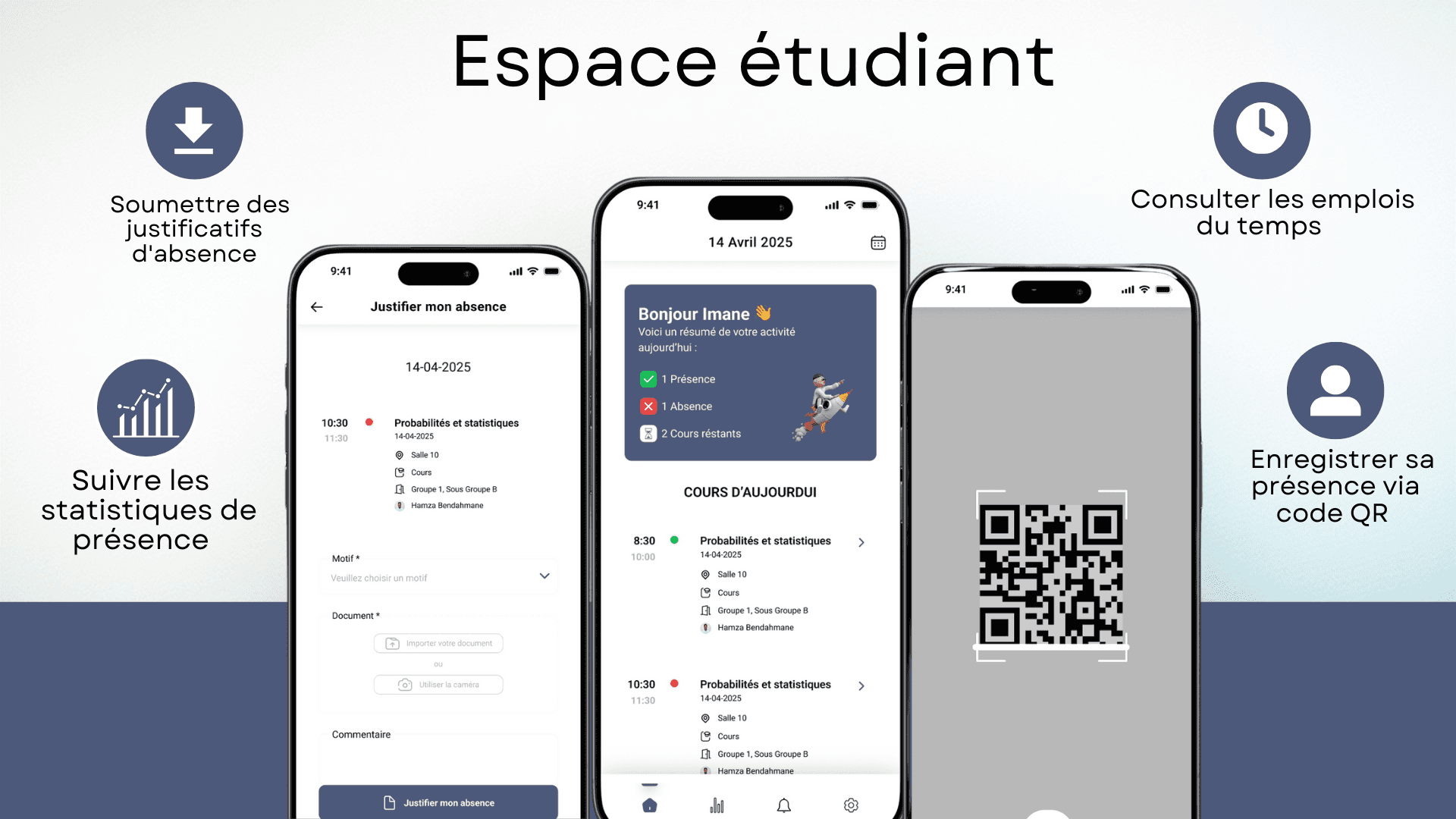
Student space
- Scan the QR code in class to confirm attendance
- See an up-to-date timetable
- Follow attendance and absences, subject by subject
- Upload an absence note (photo or PDF)
- Get a notification when the note is approved or refused
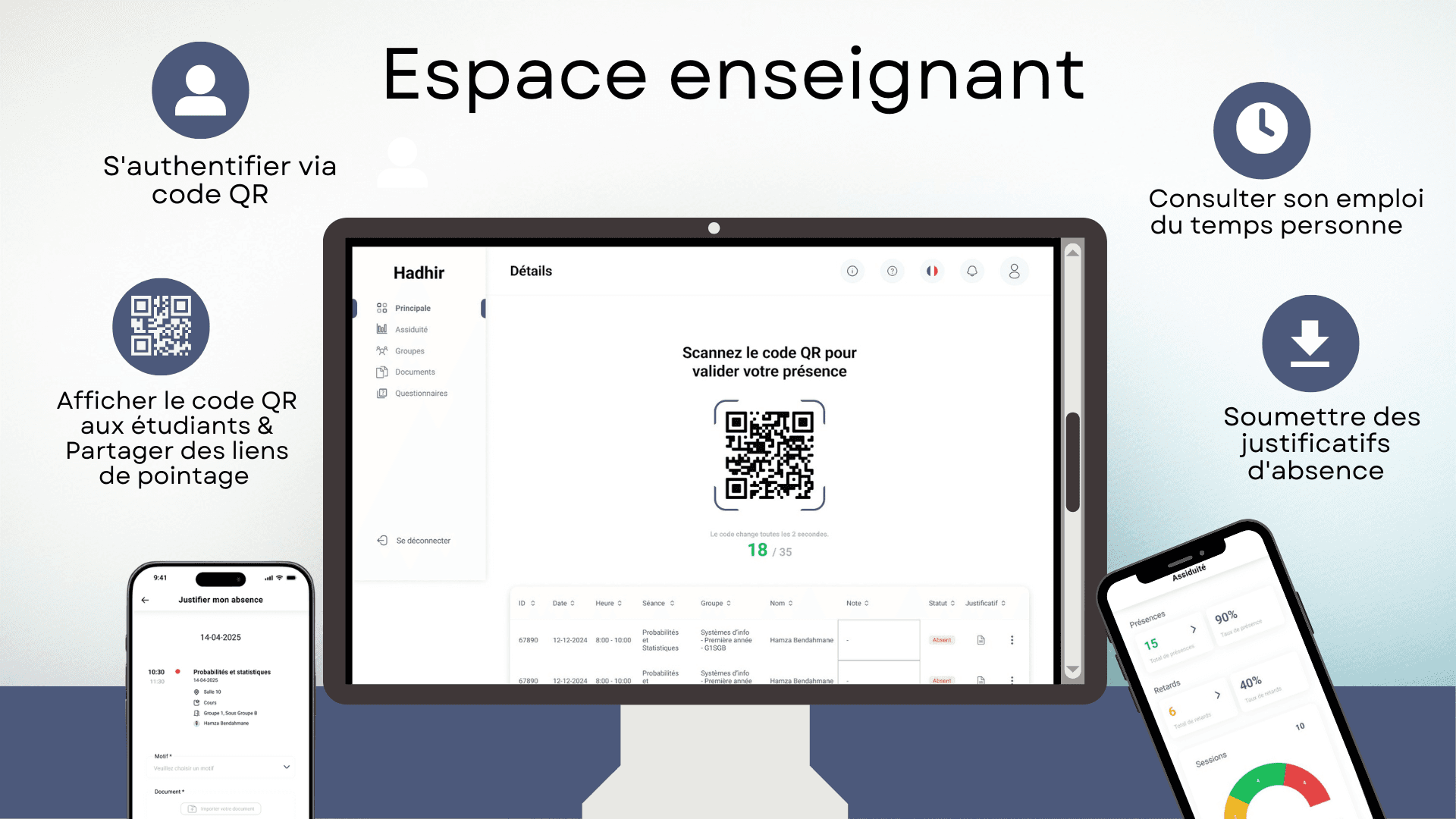
Teacher space
- Open a session: the QR code changes every 3 seconds
- See who is present and who is absent
- Mark a student without a phone present by hand
- Check the attendance history of their groups
- Print the attendance sheet for the session
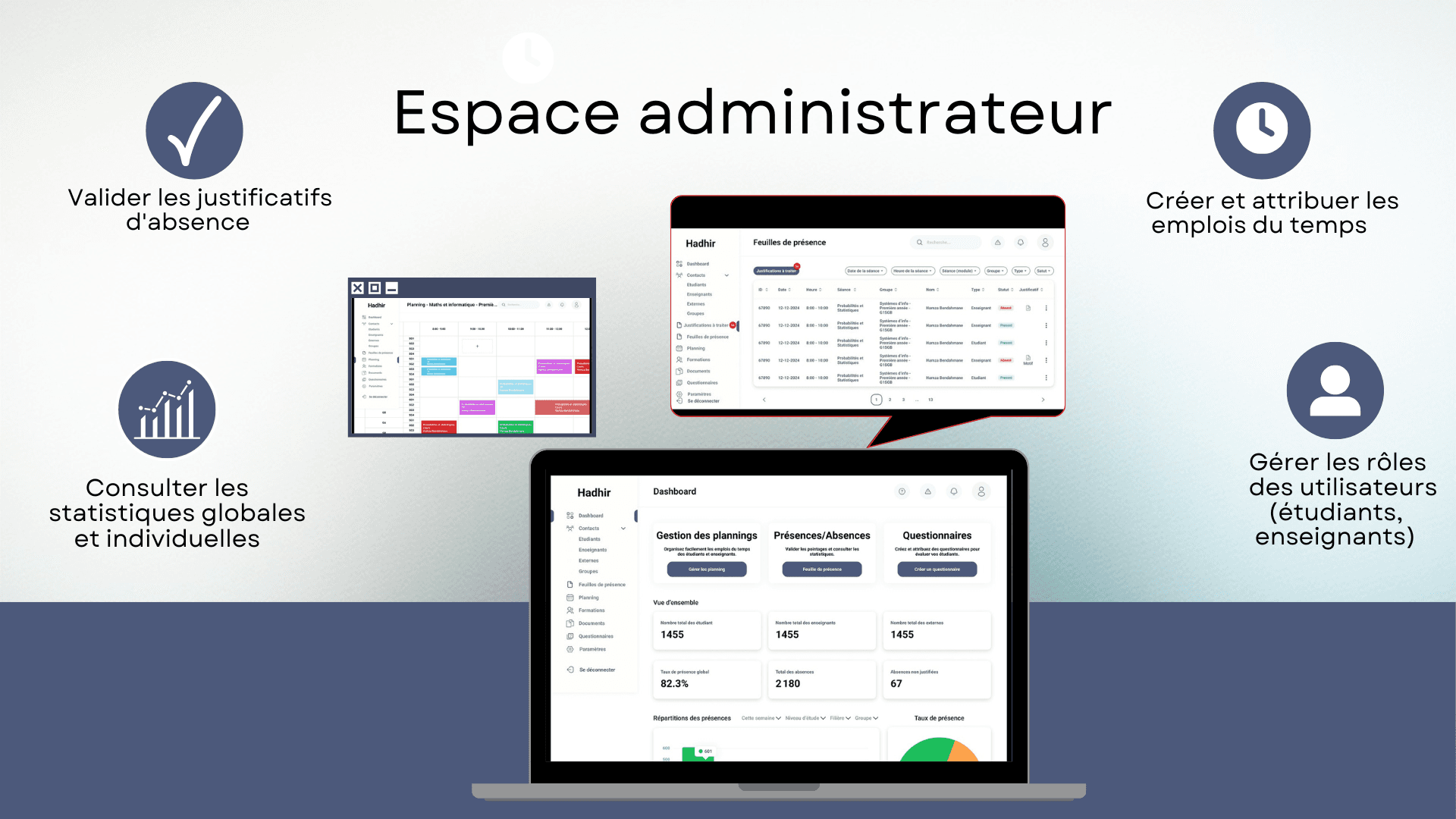
Administration space
- Dashboard filtered by department, specialty, group, subject and period
- At-risk students, in orange then red, before exclusion
- Centralised timetables, a strike day declared in one go
- Absence notes approved online, with a notification to the student
- Change log: who changed what, and when
Where is your data?
What Hadhir does today to protect student data.
One server per institution
Your database is shared with no other client. Your data is never mixed with anyone else’s.
Or on your own servers
If you prefer to keep the data in-house, Hadhir installs on your institution’s servers.
Controlled access
Encrypted connections, role-based rights, a change log and an alert on suspicious logins.
Two ways to install Hadhir
Same features either way. Pricing depends on the number of students: we send you a quote after the demo.
Hosted by Hadhir
We run the server. You have nothing to install.
- A server dedicated to your institution
- Nothing to install on your side
- Updates included
- Backups included
- Training and support for your teams
On your servers
Hadhir is installed at your institution. The data stays with you.
- Installed on your institution’s servers
- The data stays on your premises
- Support for your IT team
- Training and support for your teams
- Adjustments possible to fit your needs
The Hadhir app for students
For students only: scan the QR code in class, check your timetable and track your absences.
 Download the Android APK
Version 1.3.1 · 68 MB · Android 7.0 or later
Updated on October 17, 2026

iPhone and iPad · iOS 15.0 or later
How do I install the app on Android?
- Tap “Download for Android”. If your browser warns that this type of file may be harmful, confirm the download: this is normal for an app installed outside the Play Store.
- Open the downloaded file from the notification or from the “Files” app.
- The first time, Android asks permission to install apps from this source: tap “Settings”, allow this source, then go back.
- Tap “Install”. If Play Protect offers to scan the app, accept.
To update, download the new version from this page and install it over the old one: your data is kept.
File SHA-256 fingerprint: e981eb598da818185e1aa0df32314a70b10cadf8592cb0bf9b5f85e8eff2e5f4

On a computer?
Scan this code with your phone to install the app.
Frequently asked questions
Start with one department, this semester.
Book 30 minutes. We show you a full session: the QR code, the scan, an absence note, then the at-risk students.
Book a demoPrefer to write? contact@hadhir.dz · +213 654927992